
Heads up: Some links on this page are affiliate links. If you buy through them, we may earn a commission at no extra cost to you. As an Amazon Associate, we earn from qualifying purchases. Full disclosure
Important: This is planning information, not medical advice. Ready.gov says to talk with your medical provider about an outage plan for power-dependent devices (Ready.gov). Start there.
Bottom line: A ResMed AirSense 11 typically draws 56.1 W, or about 449 Wh for an 8-hour night (ResMed user guide). After conversion losses, a ~1,000 Wh power station covers about two nights at that rate. Check your own machine’s manual, and check what your power station’s maker says about medical use. Some, like Jackery, say they don’t recommend it.
Our pick
BLUETTI AC180: the most nights per charge of the three stations we compared, by our math: about 2.2 eight-hour nights at the ResMed AirSense 11’s 56.1 W typical draw.
Before you rely on any station: talk with your medical provider, and check your CPAP’s manual and the station maker’s medical-use guidance. Jackery, for one, says its stations aren’t recommended for medical devices.
Step 1: Find your machine’s real number
Look in the specifications section of your CPAP manual for “typical” and “peak” power consumption. For the AirSense 11, ResMed lists (user guide):
- Power supply: 65 W, 24 V DC output
- Typical power consumption: 56.1 W
- Peak power consumption: 73.2 W
Per night: 56.1 W × 8 hours ≈ 449 Wh. Heated humidifiers and heated tubing are heating elements. Ask your provider whether running without them during an outage is OK for you, and check your manual for the power figures in that mode.
Step 2: Choose a connection your CPAP maker supports
- AC outlet: plug the normal power brick into a power station’s AC outlet. Simple, but the battery’s DC is converted to AC and back to DC, which wastes some energy.
- DC: ResMed lists an Air11 DC/DC converter as an AirSense 11 accessory (user guide). ResMed’s shop describes it as plugging into a 12V or 24V auxiliary outlet (ResMed UK shop). Use the manufacturer’s cable, not a random adapter.
Step 3: Size the battery
Using Jackery’s planning formula, Wh × 0.85 ÷ watts (Jackery), at 56.1 W:
| Station (manufacturer capacity) | Est. hours | Est. 8-hr nights |
|---|---|---|
| EcoFlow DELTA 3 Plus, 1,024 Wh (EcoFlow) | ~15.5 | ~1.9 |
| BLUETTI AC180, 1,152 Wh (BLUETTI) | ~17.5 | ~2.2 |
| Jackery Explorer 1000 v2, 1,070 Wh (Jackery) | ~16.2 | ~2.0 |
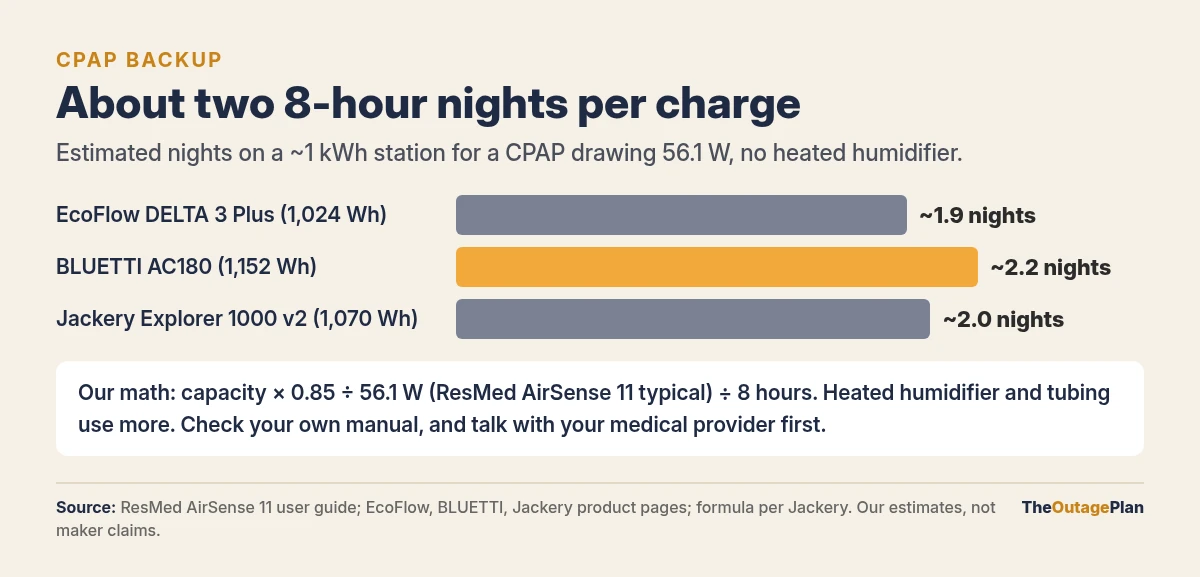
These are our estimates, not manufacturer claims. Real runtime varies with your pressure settings, humidifier use, temperature, and battery age.
Read the fine print: Jackery’s FAQ for the Explorer 1000 v2 says Jackery stations are not recommended for medical devices or life-support equipment (Jackery). Check every brand’s manual and FAQ before relying on one for medical use. And remember a CPAP is not a life-support ventilator; if you use life-sustaining equipment, your provider’s plan comes first.
Step 4: Sign up with your utility and local emergency planners
- Your utility: many utilities have a medical or life-support customer program. Ask yours what it offers, such as outage notices or disconnection protections. Don’t count on any of them to keep your power on.
- Your local emergency management office: ask whether your county or state keeps a registry for people with medical or functional needs.
Utilities can also turn power off on purpose ahead of wildfire weather, and those shutoffs can last for days. One example:

If outages in your area can run past a night or two, decide early whether a bigger battery or a gas generator used only for recharging fits your plan. Keeping the modem and router up so you can reach your provider or a telehealth portal is covered in the Wi-Fi backup guide. If someone at home also uses an oxygen concentrator, see our oxygen concentrator outage guide. Home concentrators draw about 100 to 400 W by their makers’ figures, so plan for that separately.
Night-of checklist
- ☐ Power station charged to full before forecast storms, heat waves, or planned shutoffs (your grid operator’s conservation alerts give advance notice of tight grid days; see what each level means)
- ☐ Cable or brick set up beside the bed, tested once in daylight
- ☐ Know who moves the plug when the power drops
- ☐ A backup plan: a friend’s house, a hospital, or a shelter that has power
The power stations we compare are on our Gear page. Check with your doctor or equipment provider before relying on one.
Why portable first: A power station by the bed runs quietly with no exhaust, needs no install, and travels with you, which a standby generator or wall-mounted home battery can’t. See how the three approaches compare →
We haven’t hands-on tested any CPAP power setup yet. Specs are from ResMed and the power station makers’ pages, checked Oct 18, 2026.