
Heads up: Some links on this page are affiliate links. If you buy through them, we may earn a commission at no extra cost to you. As an Amazon Associate, we earn from qualifying purchases. Full disclosure
Testing note: We haven’t hands-on tested these chargers, radios, or stations with phones. Settings come from Apple and Google support pages. Battery and port specs come from Apple, Samsung, Google, Anker, Midland, EcoFlow, BLUETTI, and Jackery, all checked Oct 19, 2026. Charge counts are our estimates.
Bottom line: Your phone is your flashlight, alert radio, and lifeline in an outage, so stretch it first and refill it second.
- Turn on Low Power Mode or Battery Saver the moment the lights go out, not at 10%.
- A 20,000 mAh power bank is about two to three full phone charges by Anker’s own formula. Charge it before every storm.
- A ~1 kWh power station holds roughly 35 to 50 phone charges by our math. That’s a week or more of phones for a family.
- Crank radios are for a short emergency call, not a full charge. Midland says so itself.
- Car charging works, but only outdoors. Never run a car in a garage attached to your house, even with the door open.
- Text instead of calling, keep calls short, and keep your key numbers on paper.
Step 1: Stretch the charge you already have
The cheapest watt-hour is the one your phone doesn’t use. Both phone makers build in a mode for this.
iPhone: Low Power Mode
Apple’s steps (Apple Support):
- iPhone 15 and later: Settings > Battery > Power Mode, then turn on Low Power Mode.
- iPhone 14 and earlier: Settings > Battery, then turn on Low Power Mode.
- Faster: swipe down from the top-right corner and tap the battery icon in Control Center, or ask Siri.
Apple says Low Power Mode sets Auto-Lock to 30 seconds, lowers brightness, turns off some visual effects, pauses iCloud Photos, and turns off automatic downloads, email fetch, and Background App Refresh. The battery icon turns yellow while it’s on. One catch for an outage: it turns itself off once you charge to 80% or higher, so turn it back on after every top-up.
Android: Battery Saver
Google’s general Android steps are Settings > Battery > Battery Saver, and you can set a schedule so it turns on by itself. Google says Battery Saver turns on Dark theme and limits or turns off background activity (Android Help). Menus vary by brand, so check your phone maker’s support site if yours looks different.
On a Pixel 3 or later, Extreme Battery Saver goes further: it pauses most apps, turns off features, and slows processing. You pick the “essential apps” that keep running. Google says paused apps won’t send notifications, but neither saver turns off essential system apps like Phone, Messages, Clock, and Settings (Pixel Help). Google lists the Pixel 10 at up to 100 hours with Extreme Battery Saver, versus 24+ hours normally (Google Store).
Habits that save more than any setting
From Google’s battery tips, plus a few of our own (Android Help):
- Dim the screen and let it turn off sooner.
- Skip video, games, and long navigation. Google calls those out by name.
- Don’t run a hotspot unless you have to. Our Wi-Fi backup guide covers better ways to keep a home online.
- Turn off Bluetooth and Location if you aren’t using them.
- Close the camera. Check the damage in daylight, take a few photos for insurance, and put it away.
About Airplane mode: Google suggests it when you don’t need the mobile network. It saves a lot, but in our view it’s the wrong call during an active storm, because it also cuts off calls, texts, and emergency alerts. Save it for overnight, when someone else in the house is keeping their phone on, and use a NOAA weather radio for warnings.
Keep it out of the heat and cold
Apple says iPhones work best at 32° to 95°F, that heat above 95°F can permanently reduce battery capacity, and that charging may pause in extreme temperatures. Cold cuts battery life only temporarily (Apple). In a summer outage, don’t leave a phone charging on a sunny dashboard. In a winter one, keep it in an inside pocket.
Step 2: How many charges a power bank really gives
A power bank is the simplest backup. It’s small, it’s silent, and it doesn’t care about the weather. The one on our Gear page is the Anker Power Bank 20K, 87W. Anker lists it at 20,000 mAh with up to 65 W from its built-in USB-C cable or USB-C port, and says it fully recharges in about 1.5 hours on a 65 W charger (Anker).
Recall check: have an older Anker Zolo Power Bank 20K (model A1689)? It’s one of five Anker models recalled in 2025 for fire and burn hazards. Find the model number on the back or side, then check the serial on Anker’s recall page (CPSC).
Why 20,000 mAh isn’t five 4,000 mAh charges: some energy is lost to heat and voltage conversion on the way into your phone. Anker’s own estimate formula is:
Charges ≈ (power bank mAh × 0.65) ÷ phone battery mAh
Here’s that formula with the typical battery sizes Samsung and Google publish (Samsung, Google Store), next to our power station estimates from Step 3:

Samsung notes its rated capacities are a bit lower than the typical figures (3,885 mAh for the S25).
iPhones: Apple doesn’t list battery capacity in mAh on its iPhone spec pages, so we can’t run the math ourselves. Anker’s own example puts an iPhone 15 battery at 3,877 mAh (Anker), which works out to about 3.3 charges from a 20,000 mAh bank by its formula. That’s Anker’s figure, not Apple’s, so we’d plan on the low side of it.
How fast: Anker says this bank’s built-in cable takes an iPhone 15 Pro to 58% in 30 minutes. Google says a Pixel 10 reaches up to 55% in about 30 minutes on a 30 W USB-C PPS charger. So half an hour on a good port buys most of a day of light use.
Tips that matter in an outage:
- Charge the bank before the storm, every time. One that’s been in a drawer for months may be half empty.
- Charge in short bursts. Topping a phone from 20% to 80% makes good use of the bank, and Low Power Mode on an iPhone turns off above 80% anyway.
- One bank per adult is a good start. A family that relies on phones for alerts shouldn’t share one. Our power bank picks compare pocket, everyday and laptop sizes.
- For earbuds or a small radio, Anker’s user guide says a double click of the button turns on a low-current (trickle) mode for the USB-A port, and the USB-C port adjusts on its own.
Step 3: Charging phones from a power station
If you already own a power station for the fridge or a CPAP, phones barely dent it. Here’s what our three picks, the EcoFlow DELTA 3 Plus, the BLUETTI AC180, and the Jackery Explorer 1000 v2, list for their USB ports (EcoFlow, BLUETTI, Jackery):

How many phone charges a station holds (our estimates)
Our math, so you can redo it for your phone:
- Phone watt-hours ≈ mAh × 3.6 V ÷ 1,000. We use 3.6 V as a round planning figure, since Samsung and Google don’t list battery voltage. Real phone cells usually run a little higher, so treat our counts as the optimistic end.
- Usable station energy ≈ capacity × 0.65. That’s Anker’s power-bank factor, which we’re borrowing as a conservative allowance for conversion and charging losses. It’s our assumption, not a station maker’s figure.
- Charges ≈ usable station energy ÷ phone watt-hours.
The results are in the chart in Step 2: about 46 to 52 charges of a Galaxy S25 and 37 to 42 of a Pixel 10. For a household: four Pixel-size phones, each charged fully once a day, need about 110 Wh a day, or roughly 9 to 10 days of phones from any of the three if the station does nothing else. In practice it’ll also run a fridge or lights, so phones are a rounding error, not the reason to buy one. Our power station sizing guide adds up the rest of the house.
Station tips
- Use the USB ports and leave the AC outlets off. The inverter costs power (about 15 W for the AC180, per BLUETTI), and a wall charger adds another conversion.
- Watch for auto-off. Jackery’s Energy Saving Mode, on by default, turns all outputs off after 12 hours at 2 W or less of USB draw. A nearly full phone can draw that little, so check it in the morning.
- Refill the power bank from the station. It’s the easiest way to carry station power to a bedroom or a car.
- Use a good cable. EcoFlow notes that a station’s maximum USB output may not be available if the cable or device doesn’t support the charging protocol.
Step 4: Crank and solar radios are a backup to the backup
Emergency radios with a crank and a USB port are great for weather alerts. Just keep your expectations low for phone charging. Midland is unusually honest about this.
- The Midland ER310 has a 3,500 mAh battery that Midland rates for up to 45 hours of normal use, plus solar, a hand crank, and a 6 × AA backup (Midland). In its FAQ, Midland says the ER310 was designed for an emergency-only charge, that newer phones draw too much, and that the radio won’t charge a device at the expense of its own battery. It also says the solar panel is meant to extend a full battery, not charge a dead one.
- The Midland ER40 has a 2,600 mAh battery. Its manual says the speed and length of cranking determine the charge, and that the radio should be fully charged before you charge anything else from it (Midland).
Midland’s spec sheets describe the crank as “perfect for a short charge to get a cell phone call made.” That’s the right way to think about it. Keep the radio for alerts, and keep a power bank for your phone. Our emergency radio guide compares the options.
Step 5: Solar for a long outage
For an outage that runs past a few days, sunlight is the refill. A folding panel such as the EcoFlow 220W Bifacial panel or the BLUETTI 200W panel can put back far more than a household’s phones use in a day, even in winter. Our solar recharge guide has sun-hour numbers for cities across the country and the wiring limits for each station.
The cleanest setup we know of is panel to station, then station to phones and power banks at night. Small phone-size solar chargers exist too, but we haven’t found maker output figures we’d plan around, so we wouldn’t count on one as your only plan.
Step 6: Charging in the car, safely
A car is a big battery with a charger built in. The FCC recommends having car-charger adapters ready as backup power for your phone (FCC). Do it right:
- Never run a car in a garage attached to your house, even with the garage door open. The CDC says so plainly. If the garage is detached, open the door first (CDC). Car exhaust contains carbon monoxide, which the CDC describes as odorless and colorless. If the power is out, here’s how to open the garage door by hand.
- Park outdoors in open air, away from windows, doors, and vents. If snow is piled up, make sure the tailpipe is clear.
- Run the engine while charging so you don’t drain the car battery you may need to evacuate.
- Have a CO alarm in the house. The CDC recommends battery-powered or battery-backup CO detectors near every sleeping area. The First Alert CO710 runs on a sealed 10-year battery.
A modern USB-C car charger makes a short charge count. The Anker Nano Car Charger (75W) has a built-in retractable USB-C cable rated up to 45 W and a second USB-C port up to 30 W, by Anker’s specs (Anker). That’s enough to top up two phones at once, or to refill a power bank while the phones charge.
Step 7: Text, don’t call, and know how alerts reach you
When a storm hits, everyone grabs their phone at once and networks jam. Cell sites need power too. After Hurricane Helene, the FCC reported:

The FCC’s advice for getting through (FCC), plus one check from Ready.gov: find out whether your home phone works in an outage and how long any battery backup lasts (Ready.gov).
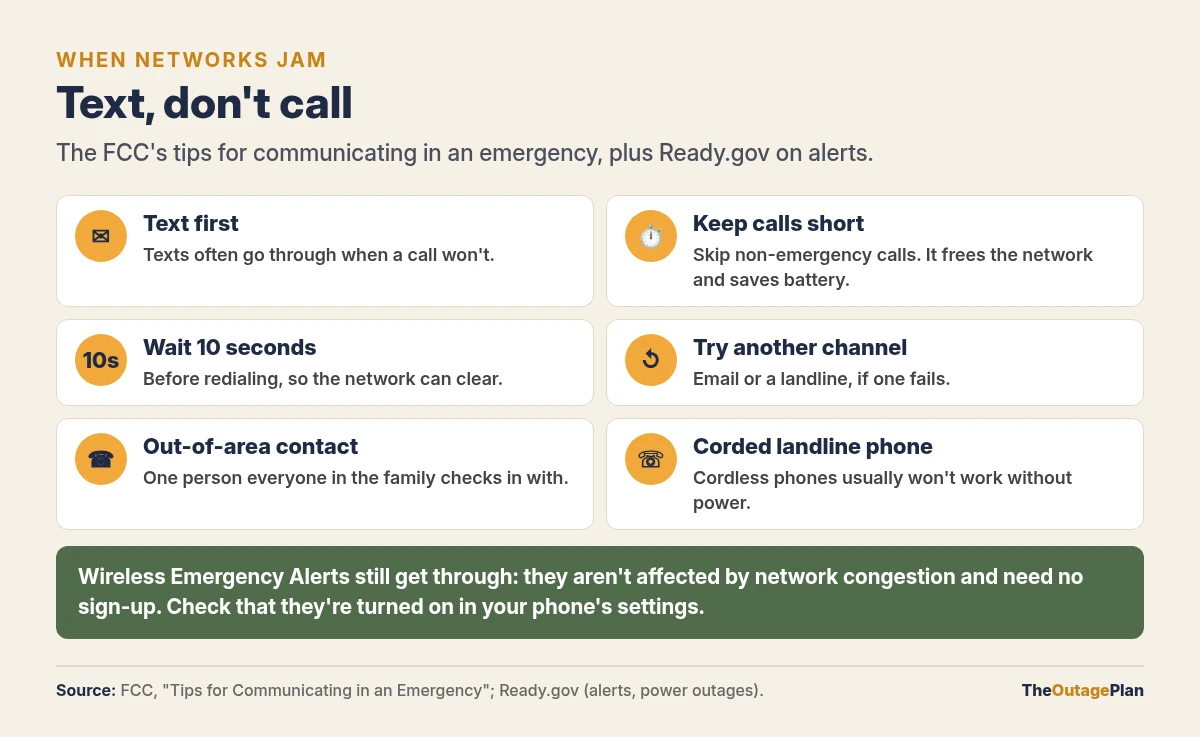
Emergency alerts still reach a saving phone. Ready.gov says Wireless Emergency Alerts look like texts but come with a unique sound and vibration, aren’t affected by network congestion, cost nothing, and need no sign-up. Some phones need WEAs turned on, and older phones may not support them (Ready.gov). Check your phone’s notification settings for emergency alerts today. Our grid alerts guide covers utility and grid-operator alerts too.
Step 8: Put your key numbers on paper
A dead phone takes your contacts with it. The FCC suggests keeping a list of emergency numbers in your phone. We’d also keep one on paper, in your kit and in your wallet. Ready.gov’s family plan form and FEMA’s Family Emergency Communication Plan card have spaces for each person’s mobile number, an “in case of emergency” contact, an out-of-town contact, and meeting places (Ready.gov). Add:
- Your power company’s outage line and account number
- Your doctor, pharmacy, and any medical equipment supplier
- Schools, child care, and workplaces
- Your insurance company and policy number
- A neighbor who can check on your home
Phone outage checklist
- ☐ Low Power Mode or Battery Saver on as soon as the power goes out
- ☐ Power bank charged before every storm, one per adult if you can
- ☐ Charging cables for every phone in the house, plus a spare
- ☐ Emergency alerts turned on in each phone’s settings
- ☐ A crank or battery radio for alerts, so phones can rest
- ☐ A car charger, used only outdoors with the engine running
- ☐ A battery CO alarm if a car or generator is in the plan
- ☐ Key numbers on paper, in your kit and your wallet
The power bank, radios, stations, panels, car charger, and CO alarm are on our Gear page. For the rest of a basic kit, see our 72-hour outage kit checklist.
FAQ
How do you make your phone battery last longer in a power outage?
Turn on Low Power Mode (iPhone) or Battery Saver (Android) right away, dim the screen, and skip video, games, and hotspots. On a Pixel, Extreme Battery Saver pauses most apps but keeps Phone and Messages running. Text instead of calling when you can.
How many times will a 20,000 mAh power bank charge your phone?
About two to three full charges for a current Samsung or Pixel phone, using Anker’s formula (bank mAh × 0.65 ÷ phone mAh). By Anker’s own iPhone 15 example (3,877 mAh), that’s about 3.3 charges. Apple doesn’t publish iPhone battery capacity, so we can’t check that ourselves.
How many phone charges can you get from a power station?
Roughly 35 to 50 for a ~1 kWh station like the DELTA 3 Plus, AC180, or Explorer 1000 v2, by our estimate. That’s using a 0.65 loss factor and a 3.6 V conversion we chose, not a station maker’s figure. Use the USB ports and leave the AC outlets off.
Can you charge your phone with a hand-crank radio?
Only a little. Midland says its ER radios are meant for an emergency-only charge, that newer phones draw too much, and that the crank is for a short charge to get a call made. Use the radio for alerts and a power bank for your phone.
Is it safe to charge your phone in the car during a power outage?
Yes, if the car is outdoors in open air. The CDC says never to run a car or truck in a garage attached to a house, even with the door open. Keep the tailpipe clear and run the engine while charging so the car battery doesn’t drain.
Settings checked Oct 19, 2026, from Apple Support (Low Power Mode) and Apple’s battery page, Android Help, and Pixel Help. Phone batteries are from Samsung’s Galaxy S25 page and Google’s Pixel 10 specs. Apple doesn’t publish iPhone battery capacity. Power bank specs and formula are from Anker. Station ports are from EcoFlow, BLUETTI, and Jackery. Radio specs are from Midland. Safety and communication guidance is from the CDC, FCC, and Ready.gov. Charge counts are our estimates, not manufacturer claims.